Image Morse decoder benchmark
Version 2026-10-03.1. Nine inputs, including independently sourced diagrams and a real outdoor photograph. Every automatic output is listed, including failures.
What this test measures
The default run uses automatic threshold and polarity, with no manual editing. Each source file is decoded at its native resolution. The rotated and bordered controls also have a separate run after the stated preprocessing. A default result is not replaced by its corrected version.
Five synthetic controls share one message, MEET AT NOON. They test a clean strip, inversion, low contrast, a 90° rotation and caption or border interference. They are diagrams made for testing, not screenshots of customer work or photographs. The four other cases use two independent diagrams (one with an inverted derivative) and one independently sourced photograph.
This small set is useful for repeating regressions and seeing limitations. It is not a representative accuracy estimate for real photographs, a comparison with other sites, or a claim that a high detection check proves the message is correct.
clean

synthetic control
Intended reading: MEET AT NOON
Default output: MEET AT NOON
Detected Morse: -- . . - / .- - / -. --- --- -.
No adjustment needed; check every letter gap.
Try this image in the readerrotated

synthetic 90° rotation
Intended reading: MEET AT NOON
Default output: E E E E E E E E E E
Detected Morse: . / . / . / . / . / . / . / . / . / .
After stated preprocessing: MEET AT NOON
Rotate left 90°, then compare the text.
Try this image in the readerinverted

synthetic inversion
Intended reading: MEET AT NOON
Default output: MEET AT NOON
Detected Morse: -- . . - / .- - / -. --- --- -.
Automatic polarity handles this input; check Invert if needed.
Try this image in the readerlow-contrast

synthetic low contrast
Intended reading: MEET AT NOON
Default output: MEET AT NOON
Detected Morse: -- . . - / .- - / -. --- --- -.
Start with Auto threshold; move the slider only if mark cores disappear.
Try this image in the readerborder
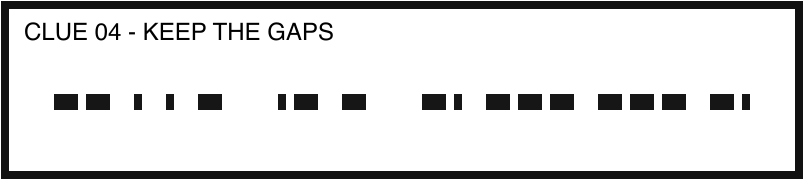
synthetic screenshot with caption and border
Intended reading: MEET AT NOON
Default output: T ▉▉ E E5S▉E T
Detected Morse: - / ......... .............. / . / . ..... ... .......... . / -
After stated preprocessing: MEET AT NOON
Crop left 3.73%, top 38.89%, right 96.27%, bottom 74.44%. Keep only the strip.
Try this image in the readercommons-sos

independent public-domain diagram
Intended reading: SOS prosign (...---...)
Default output: ▉
Detected Morse: .-....---...
It is a continuous SOS prosign, not three spaced letters. Review the SOS candidate or insert spaces as ... --- ... for the letter translator.
Original source · Bonzo; spacing revision by Verdy p. Public domain.
Try this image in the readercommons-sos-inverted

inverted derivative of independent diagram
Intended reading: SOS prosign (...---...)
Default output: ▉
Detected Morse: .-....---...
Invert separates the marks. The missing letter gaps still need the SOS prosign interpretation.
Original source · Bonzo / Verdy p. Public domain. Colours inverted by this site.
Try this image in the readercommons-metadata

independent stylised diagram
Intended reading: METADATA
Default output: EIIEHEI
Detected Morse: . .. .. . .... . ..
This Wikidata-style layout is not a horizontal short/long strip. Compare it manually with the source; automatic width detection may fail.
Original source · Daniel Mietchen, CC0 1.0. SVG rasterised on white.
Try this image in the readercommons-v-photo
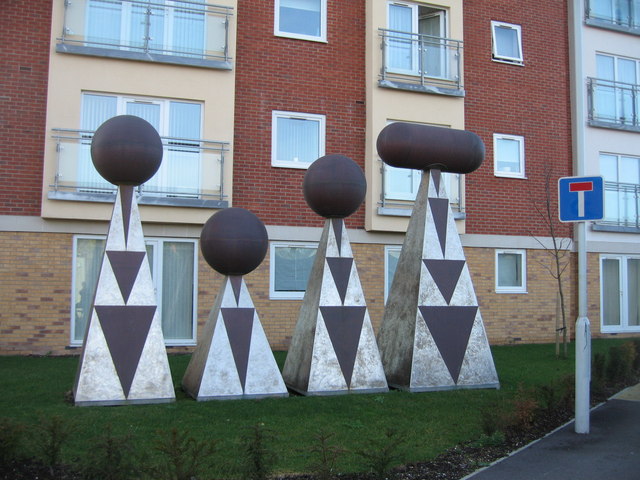
independent outdoor photograph
Intended reading: V (...-)
Default output: ▉
Detected Morse: -..-....
The outdoor shapes are not a clean printed row. Read three dots and a dash manually as V; do not rely on automatic output.
Original source · Sebastian Ballard / Geograph, CC BY-SA 2.0. Original unchanged. Licence
Try this image in the readerRepeat the check
- Download the ZIP and keep its manifest with the images. The manifest includes each file's SHA-256 hash, dimensions, expected reading and measured output.
- Open an image in the image translator and leave its automatic controls unchanged.
- Copy the detected Morse and compare it with the manifest. Record exact wording, including unrecognised characters.
- Only then try the stated crop or rotation. Record that second output separately.
- For a no-gap stream, list possibilities or use known context. Do not count a manual transcription as automatic success.
Source and licence details
Synthetic controls by this site are CC0 1.0. The SOS diagram by Bonzo, with a spacing revision by Verdy p, is public domain. The Metadata diagram by Daniel Mietchen is CC0 1.0; it was rasterised on white. Sebastian Ballard's Geograph photograph is unchanged and licensed CC BY-SA 2.0. The ZIP retains credits and links. None of these authors endorses this tool.
The stylised Metadata diagram and outdoor V photo show why arbitrary graphic layouts need manual reading. The continuous SOS example is a recognised prosign; the ordinary-letter translator cannot infer that context just from missing gaps.
Follow the crop, rotate and spacing walkthrough · All resources